

How to Migrate a Website Without Losing Your Google Rankings: A Practitioner's Checklist
The short answer
You can migrate a website without lasting damage if you treat it as an SEO project, not just a design project. Inventory every URL, map each one to its closest new equivalent with a single-hop 301 redirect, carry over the content and metadata that earn your rankings, test on a hidden staging site, launch carefully and monitor for weeks.
Expect some temporary fluctuation, and keep the redirects for at least a year.
Most ranking losses after a migration come from a short list of avoidable mistakes. Redirects that were never built. A staging block was left switched on. URLs changed "for neatness" with no map. Pages trimmed during a redesign because the new template looked better with less text. None of these are exotic. All of them are preventable.
SaptTech Labs' view, after building and rebuilding sites for clients, is that a migration is not a design project that happens to touch SEO. It is an SEO project that happens to include design. That changes who needs to be in the room, and when. We work mostly with WordPress and Elementor Pro, Shopify and custom builds, so the notes below lean toward those platforms.
Case in point: Ziyyara.com
One of the migrations we have handled was for Ziyyara (ziyyara.com), a live one-to-one online tutoring platform serving students in more than 20 countries, from Grade 1 to 12. The site runs on WordPress with Elementor, and its main navigation alone links to more than a hundred landing pages: one for each exam board, subject, class, language, country and city.
A site built like that is where migrations go wrong quietly. Each of those pages earns its own small slice of search traffic, and one broken redirect rule or leftover noindex can cost the whole set at once.
Ziyyara.com migration at a glance | Details |
|---|---|
Platform | WordPress with Elementor |
Type of move | Complete website redesign along with URL restructuring |
When | Late 2024 |
URLs in scope | 100+ URLs audited, mapped and migrated |
What we did | 1. Conducted a complete URL inventory and SEO audit of existing landing pages. 2. Created a one-to-one 301 redirect mapping for changed URLs. 3. Tested the redesigned website on a staging environment, checking SEO elements, redirects and indexing settings. 4. Performed post-launch monitoring to identify redirect issues, indexing problems and technical SEO errors. |
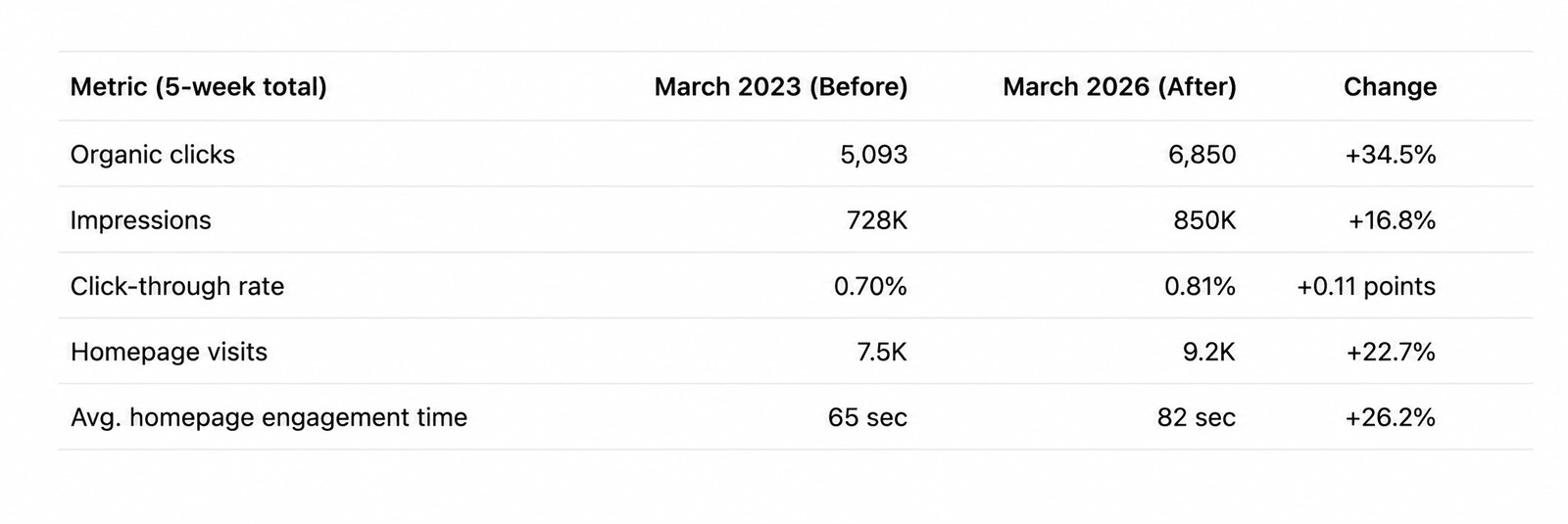
Before and after | 1 March to 30 March 2023 (before the migration) and 1 April to 31 April 2026 (after) |
First, work out what kind of move you are making
"Migration" covers very different projects. The risk depends mostly on whether your URLs change.
Type of move | Example | URLs change? | Main action |
|---|---|---|---|
Redesign, same URLs | New Elementor design on the same WordPress site | No | Preserve content, metadata, internal links and speed |
Protocol or www change | HTTP to HTTPS, or www to non-www | Yes | Site-wide 301s. No Change of Address tool |
URL path change | /page.php?id=1 to /widget | Yes | One-to-one redirect map. No Change of Address tool |
Platform change | WordPress to Shopify | Usually yes | Redirect map built around the new platform's URL rules |
Domain change | oldbrand.com to newbrand.com | Yes | 301s plus the Change of Address tool |
One more piece of advice from Google's site-move guidance that clients rarely want to hear: if you can, split the work into smaller steps. Redesigning, changing platforms, restructuring content and changing domain all in the same weekend means that if rankings fall, nobody can tell which change caused it.
Book A Free Consultation!
The checklist, in the order SaptTech Labs would do it
1. Benchmark everything before you touch anything
Crawl the live site and export the results. Pull your top pages and queries from Google Search Console, your landing-page traffic and conversions from analytics, your backlink profile, and your current rankings for the terms that matter. Save page speed scores for your key templates. If you can't show the before, you can't prove or fix the after.
2. Inventory every URL
Combine the crawl, the XML sitemap, Search Console, analytics and your backlink tool. Each source misses things the others catch: old campaign pages, orphaned landing pages, PDFs, images that earn links. Mark which URLs bring traffic, which have backlinks and which convert.
3. Decide what survives
Sort every URL into keep, merge or retire. Keep what performs. Merge thin duplicates into the strongest page. Retire what has no value and no traffic. Whatever you decide, don't send everything to the homepage. It is poor for users, and redirects to irrelevant pages can be treated as errors.
4. Build the redirect map
This is the document that decides the outcome. Every old URL gets one row, pointing to the closest relevant new page. Use 301 or 308, which Google treats as permanent. Use 302 or 307 only for genuinely temporary moves. Point each old URL straight at its final destination, with no chains.
Old URL | New URL | Redirect | Note |
|---|---|---|---|
/services/seo.html | /seo-services/ | 301 | Same intent, cleaner path |
/blog/2022/05/seo-tips | /blog/seo-tips/ | 301 | Date folders removed |
/shop/blue-widget | /products/blue-widget | 301 | Shopify prefix |
/old-promo-2019 | /offers/ | 301 | Closest relevant page |
/uploads/brochure.pdf | /downloads/brochure.pdf | 301 | Move PDFs and images too |
The rows above are illustrative.
5. Carry over what makes pages rank
This is where redesigns quietly lose traffic. Check that the new pages keep the same title tags, meta descriptions, headings, body copy, image alt text, internal links, structured data and canonical tags. Every new page needs a self-referencing canonical. If you run Arabic and English versions, check the hreflang tags in both directions and keep each language's URLs stable.
6. Build and test on a hidden staging site
Keep staging out of Google's index, with password protection being the safest option. Crawl it the way you crawled the live site, then test the redirect map in bulk. Check forms, tracking tags, analytics, Search Console verification, mobile layout and page speed. Make a written list of every noindex rule or robots.txt block you added, so each one is removed on launch day.
7. Launch day
- Deploy the new site and switch on the redirects.
- Remove every staging block: noindex rules, robots.txt disallows, password protection.
- Spot-check redirects and key pages, then use the URL Inspection tool in Search Console on a sample.
- Submit the new XML sitemap.
- For a domain move, file the Change of Address tool once the redirects are live. It works only at the domain level, and not for HTTP to HTTPS or path changes.
- Verify every variant of old and new sites in Search Console: www and non-www, HTTP and HTTPS.
If you have a say in the date, avoid your peak trading period. For a Gulf retailer that might be the lead-up to Ramadan or White Friday.
8. Monitor closely
Check the Page Indexing report in Search Console daily for the first two weeks, then weekly. Watch for new 404 errors, indexing drops, ranking changes on your priority terms, speed regressions and falls in conversions. Fix problems in order of impact. Google crawls a freshly moved site more heavily for a while, so make sure the server can cope.
9. Keep the redirects, and the old domain
Google's site-move guidance says to keep redirects for as long as possible, generally at least a year. The Change of Address tool's help page mentions at least 180 days. These are different clocks. Go with the longer one, and keep the old domain registered so the redirects keep working.
What a normal dip looks like, and what isn't normal
Google says to expect temporary ranking fluctuation after any significant change. It describes a site move as complete only when Googlebot has visited every URL on the old and new sites at least once, and it happens URL by URL. Google doesn't publish a standard percentage drop or a standard recovery time, and nobody who quotes you one is working from Google's data.
In practice, I separate two situations. A wobble that settles over a few weeks is normal. A sharp, sustained fall, especially across the whole site, is a diagnosis job. The usual suspects are a leftover noindex, a broken redirect rule, a server error or a block in robots.txt. Know your rollback criteria before launch, and resist editing redirects every day in a panic. Constant changes can make recovery slower.
The best insurance is the baseline from step one. It turns "I think traffic is down" into "these 40 URLs lost these queries, and this is why".
Platform notes
WordPress and Elementor
Keep the permalink structure unless there is a strong reason to change it. During a redesign, check that templates haven't dropped the H1, shortened body copy or hidden content behind scripts. Carry your SEO plugin settings across, including titles, canonicals and schema, and watch page speed, since heavy builder layouts can slow pages down.
WordPress to Shopify
Shopify uses fixed path prefixes: /products/, /collections/, /pages/ and /blogs/. You can control the handle that follows the prefix but not the prefix itself, and collections can't be nested the way WordPress categories can. So nearly every URL changes, and every one needs a redirect. Shopify has a URL redirects tool under Online Store, then Navigation, which accepts a CSV import for bulk redirects.
Custom and JavaScript-heavy builds
Make sure the content Google needs is available when the page is crawled, using server-side rendering or prerendering where required. Handle redirects at the server level, generate sitemaps automatically and set canonicals per page. These are easy to forget when the front end is the exciting part of the project.
Bilingual Arabic and English sites
Keep each language on stable URLs, apply hreflang in both directions and test right-to-left layouts on staging before launch. Check that both language versions appear in the sitemap.
The mistakes we see most
- Leaving staging blocks switched on after launch.
- Redirecting everything to the homepage.
- Using 302 redirects, or building redirect chains.
- Cutting content during the redesign because it looks cleaner.
- Forgetting images and PDFs that earn traffic or links.
- Changing URLs for tidiness when there was no need.
- Launching without analytics or Search Console verification working.
- Letting the old domain expire after a few months.
- Having no baseline to compare against.
Can an agency in India run a migration for a UAE, Oman, UK or US business?
Yes. A migration is almost entirely remote work: crawling, mapping, building, testing on a staging link and monitoring. What it needs from you is access and fast decisions. You should own your domain, DNS and hosting accounts, and give the agency delegated access, and you should be available on launch day for approvals. We put the launch window, rollback criteria and responsibilities in writing before work starts.
See our case studies: sapttechlabs.com/case-study/
When to do it yourself, and when to call a specialist
A small brochure site getting a visual refresh on the same platform with the same URLs is a reasonable job for a careful in-house team, using the checklist above. A site with hundreds of URLs, a domain change, a platform change or meaningful organic revenue is different. One missed redirect rule can undo years of work, so bring in someone who has done it before.
Frequently Asked Questions
Will I lose rankings if I redesign my website?
Not necessarily. If your URLs, content, titles, internal links and page speed carry over, a redesign carries relatively low risk. Removing content, changing URLs or breaking technical settings is what causes losses. Google says to expect some ranking fluctuation after any significant change while it recrawls and reindexes your site.
Do I need 301 redirects when moving to a new domain?
Yes. Each old URL should redirect permanently to its closest equivalent on the new site, ideally in a single hop. Google treats 301 and 308 as permanent signals and 302 and 307 as temporary. For a domain-level move you should also use the Change of Address tool in Search Console once the redirects are live.
How long should I keep 301 redirects?
Google's site-move guidance says to keep them as long as possible, generally at least one year. The Change of Address tool's own help page mentions at least 180 days. Take the longer figure, and keep the old domain registered so the redirects keep working.
What is the Change of Address tool, and do I always need it?
It is a Search Console tool for moving a site from one domain or subdomain to another. You don't use it for HTTP to HTTPS changes or for URL path changes within the same domain. Those rely on correct redirects, canonicals and sitemaps.
How long until rankings recover after a migration?
There is no universal figure. Google says the move happens URL by URL and is complete only when Googlebot has visited every old and new URL at least once, and it has indicated that a medium-sized site can take a few weeks for most pages to move. Judge progress on the trend over several weeks and escalate if a drop is sharp or doesn't stabilise.
Can I keep the same URLs when moving from WordPress to Shopify?
No, not exactly. Shopify uses fixed path prefixes such as /products/, /collections/, /pages/ and /blogs/, so most WordPress URLs change. You can control the handle after the prefix, then redirect every old URL to its new equivalent using Shopify's URL redirects, which accept a bulk CSV import.
Should the staging site be hidden from Google?
Yes. Block it from search while you build, with password protection being the safest option, and make removing that block an explicit item on your launch checklist. A staging noindex rule left live after launch is one of the most common and most damaging migration mistakes.
Will a migration affect my Google Business Profile?
Your profile isn't affected by the migration itself, but if your website address changes you should update the website link on the profile, and make sure the old address redirects to the new one. Keep your business name, address and phone details consistent.
Tell us what you are moving, how many pages it has and how much of your business comes from search. We will tell you where the risks are, what we would do first and what a safe launch looks like. If you don't need an agency for it, we will say so.